Thumbs Voting: A simple tool for shared decision making
My favorite tool for shared decision-making in meetings is called Thumbs Voting (or more casually referred to as “Thumbs”).
Thumb Voting is a simple approach to consent-based decision making that has everyone quickly respond to a proposal to determine where the group stands as a whole on a topic.
Thumbs voting is an inclusive, accessible, and effective decision making tool for large and small groups, making big and small decisions, and meeting in-person or virtually.
Having a tool for shared decision making is critical for groups trying to create more inclusive and equitable processes and organizational cultures. Shared decision making invites everyone, including those who will be directly affected by the decision, to participate and have their perspectives and thoughts considered.
You’ll be in awe of how enthusiastic participants will feel about group decisions AND how much time you’ll save in meetings!
How it Works
In preparing for a meeting, I identify points in the agenda where we will have a “Consent Decision Question”. The question always takes the form of “Does the group agree to…..” then the details of the proposal.
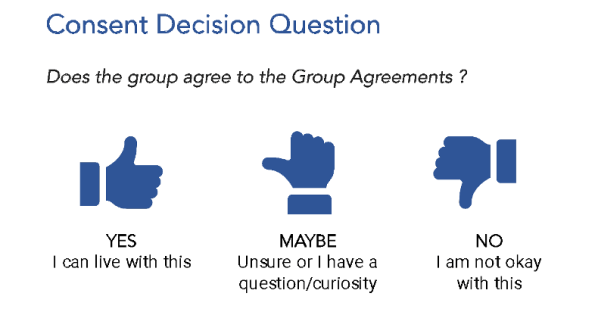
The THREE response options are:
- Thumbs Up/YES: I can live with this
- Thumbs Sideway/MAYBE: I’m unsure or I have a question/curiosity
- Thumbs Down/ NO: I’m not okay with this
Image 1: Sample Consent Decision Question PowerPoint Slide
Everyone in the group then puts up their thumb (or responds in the chat). If anyone gives a thumbs sideway or down (or MAYBE/NO), then we pause to inquire about this participant’s curiosity or objection to the proposal. We then workshop the proposal around this point of curiosity or objection.
Once the curiosity or objection is addressed, update the proposal, and propose the Consent Decision Question. I find that typically by this point all participants will respond with a Thumbs Up/YES that they “can live with the proposal”, thereby indicating that the shared decision has been made and the group can move forward.
The Background
I started using thumbs voting in the peak of the pandemic when I was frequently hosting Zoom meetings for a collaborative community event planning process hosted by a local government. I desired to have every decision we made – especially those early ones about our vision and values for the project – to reflect the preferences, interests and buy-in of the whole diverse group. I knew if our decision didn’t reflect the whole group, we’d be subject to significant push-back and criticism later on in the project.
A social justice organization I was a part of at the time was learning how to use Sociocracy, a self-governance model that uses consent decisions making processes. Sociocracy felt too complex for this larger, diverse group I was working with, but I found Sociocracy’s definition of “consent” and “objections” to be incredibly useful in thinking how to create an accessible process for shared decision making.
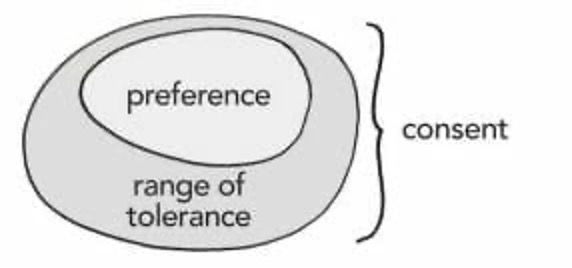
Sociocracy defines a “Yes” for consent to a proposal as including your “range of Tolerance”, which is “everything that is not our preference but also not something we would object to” (see image 1). I like to think of a consent YES as “I can live with this”, rather than an “I agree.” Relatedly, if someone objects to the proposal in Sociocracy, than the group most re-work the proposal until everyone in the group can “live with” what is there.
Image 2: Sociocracy consent model (Source: Sociocracy for All)
Building off what I learned from Sociocracy, the Thumbs Voting approach emerged as a simplified, accessible, efficient and effective tool for helping groups of all sizes and dynamics participate in shared decision making.
Thumbs in Action
I recently used Thumbs Voting at a retreat with over 45 people from diverse backgrounds and experiences. The retreat focused on how to apply a racial and social justice and equity lens to their evolving field, and using that lens to re-vision the organization’s mission, vision, and values.
After three hours of collaborative visioning and brainstorming, I had the group consolidate their discoveries into a single list of “converging” ideas. We then took the list to a Thumbs Vote.
The consent decision question was: “Does this list capture what our whole group explored today?”
We voted first at the table level. Three of the seven tables gave a “thumbs sideway” which meant we needed to pause. There were “thumbs down” – there almost never are.
Each of the participants who gave a “thumbs sideway “ was invited to share their curiosity or point of uncertainty. We quickly discovered that *one word* on the list was not sitting well with a few people. We explored the cause for this discomfort, brainstormed an alternative way to describe the idea, edited the proposal list, and put the proposal back to Thumbs Vote.
The proposal quickly passed – thumbs up!
I kid you not, in just 15 minutes, this large, diverse group with many diverging opinions was able to form a consensus about how to move forward. Not everyone necessarily 100% agreed with the list, but 100% of participants could live with the proposal.
I call that an efficient, inclusive SUCCESS!
The Benefits of Thumb Voting
In the short term, Thumbs Voting:
- Quickly assesses where a group stands on a proposal. In a matter of seconds you will see if the group is in full agreement or if there’s a curiosity and/or objection that needs to be further explored.
- Encourages active participation. Because everyone is required to voice their opinion on the proposal, participants practice more active attention, processing and engagement throughout the meeting.
- Saves time. Rather than taking 5 minutes talking about something, try putting it to a thumbs vote after 1 minute. Most of the time I find that the group is in agreement and ready to move on, especially for smaller decisions.
- Helps identify more complex or contentious decisions. Maybe a Thumbs Vote didn’t end up in agreement as easily as you thought it would. What helpful feedback that is to the group! Take your time exploring those points of contention and curiosity. It’s where the juicy pieces and growing edges lie.
- Encourages constructive conversation and healthy dissent. Sometimes we assume everyone is in agreement, only to discover later that that wasn’t the case. By having an active shared decision making process, those points of confusions, dissent or curiosity within a group are revealed and explored early on, ultimately building greater long-term momentum and buy-in.
- Supports a group in pivoting and being iterative, rather than getting stuck. Sometimes a group needs more time to make a decision on a topic. Rather than just tabling a decision to the infinite future, Thumbs Voting encourages the group to propose an interim solution that can indicate next steps and/or invites new directions for a decision.
- Fosters a sense of group progress. Often people feel like meetings involve a lot of talking without accomplishing much. By building in decision-points throughout the meeting, the group feels like they have taken an action together and are positioned to move forward after the meeting. It makes meetings feel efficient and productive.
- Encourages synthesis and clarity. Thumbs Voting invites the facilitator/notetaker to share back a synthesis of what they think they heard a group say in order to provide the details of the consent decision proposal. The group must confirm that what they heard was correct before they can vote. This helps build clarity around the point of agreement, which is especially useful after a long and/or large group discussion that may have traveled in many directions.
- Is widely accessible tool for shared decision making. Consensus processes can be complex and cumbersome, especially for larger groups. But with thumbs voting, people who’ve never done or even heard of consensus are able to easily participate in shared decision making. It even works in large groups!
In the long term, Thumbs Voting:
- Fosters inclusive dialogue and decision making because everyone, regardless of their status in the meeting, is invited to share their opinion and express their boundaries. This is especially important for decisions that directly affect participants who may not typically hold decision making power.
- Keeps meetings and projects moving forward. Thumb Voting proposals instigate making a decision, even it’s not the one the group initially intended to make. It allows the group to be responsive to unexpected challenges and roadblocks, while simultaneously chartering a new path forward. Getting indefinitely stuck on a decision is less likely occur.
- Promotes a culture of learning and sharing and creative solutions. Because Thumbs Voting encourages participants from all levels to share, proposals are more likely to include learnings and ideas from voices that we don’t typically hear from, who often creative and innovative ideas. Participants are encouraged listen to each other and consider opinions different than their own. It prompts iterative thinking that build on old ideas or dream up new ones.
- Develops leadership skills. It is empowering for lower-level and/or younger participants, who typically are excluded from decision making processes, to have their perspectives shape decisions.
- Builds buy-in and momentum. Thumbs Voting ensure that everyone’s thoughts and opinions are captured throughout the process, not only at the end of a process. When people feel like the proposal reflects and integrates their opinions, they are more likely to want to continue to engage and/or support the proposal in the long term.
- Promotes Equity: Shared decision is a core tenant of fostering a more equitable organization because it allows people who will be directly affected by a decision to be a part of the decision making process, thereby re-distributing power among people/levels of an organization.
How to implement Thumbs Voting in your organization:
Thumbs Voting takes all of 30 seconds to introduce to a group.
Here’s my typical script (BORROW IT!):
“We’re going to practice consent voting during our meeting today. Throughout the meeting I’m going to give a proposal, and I want you to show me: “thumbs up, thumbs sideway or thumbs down”
(modeling with your thumb while you say this)
Thumbs up means “I can live with this”.
Thumbs sideway means “I’m not so sure or I have a question/curiosity”
Thumbs down means I’m not okay with this.
If there are any thumbs sideways or thumbs down, we will pause as a group to explore this, and will move forward once we have all thumbs up. (*note: in virtual space I say the same thing, but replace up/sideways/down with typing YES/MAYBE/NO into the chat– it works the same otherwise)
And That’s it! You’re ready to go!
Usually I’ll do a practice Thumbs Vote on a proposal that is fairly easy – such as agreeing to the agenda or group agreements for the day. The group quickly sees how it works and is ready for the next decision point, which likely will be more challenging proposal
Use Thumb Voting throughout the meeting. I like to use it for small check ins on how people feel about an idea – maybe read of list of ideas and have everyone in the group show their thumbs to check for excitement or enthusiasm.
I also use it when working through important proposals and decisions to make sure everyone is the group feels represented in the decision and “can live with” what the group decides.
With more structured meetings and/or larger groups, I will prepare the consent-decision making questions in advance, recognizing that these questions may have to adapt with the conversation.
Download this *FREE* Consent Decision Voting PowerPoint Slide template for your next meeting!

If you try Thumbs Voting, let me know how it goes in the comments! I also welcome questions, curiosities and/or feedback.
 Hilary Pollan Facilitation